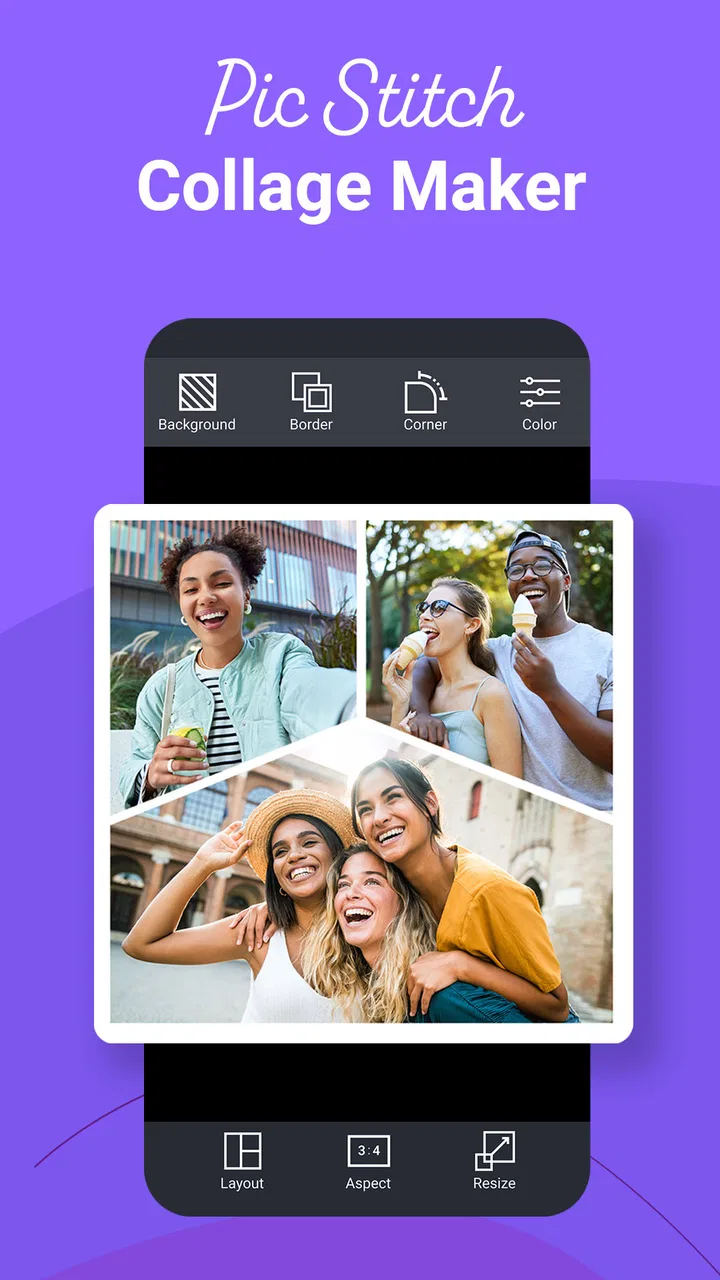
Pic Stitch: Collage Maker
- 3.4
- Rating
- 5.00M
- Installs
- Free
- Price

 Analysis by App-foxy
I spent time with Pic Stitch as a practical photography app rather than treating it as a novelty collage tool. Its main job is straightforward: place several photos into a single framed composition, then help you turn that arrangement into something worth sharing or saving. That narrow focus is also its appeal. I do not have to open a full photo editor, build a canvas from scratch, or spend several minutes deciding where every image belongs before seeing a useful result.
Developed by Maple Media, this free app sits in the photography category and is aimed at people who want quick visual layouts on a phone. The audience is broad: someone making a birthday collage, a traveler arranging a small set of holiday pictures, a seller presenting several views of an item, or a parent collecting moments from a school event. Its Teen content rating is worth noticing for families, especially because the finished images may be shared through other services and the app includes optional purchases.
How the collage workflow feels on a phone
The first thing I noticed is how different the experience feels from editing one photograph. A single image editor encourages me to correct exposure, crop carefully, and refine details. Pic Stitch instead asks me to think in groups. The important decision is not just which photo looks best, but which photos tell a small story together and how much visual space each one deserves.
You May Also Like

 Google Keep - Notes and lists
Google Keep’s Quiet Growth Shows the Appeal of Simpler Notes
As mobile work gets busier, Google Keep keeps winning a simple contest: capture a thought quickly, find it later, and get on with the day.

 Blood Strike: 2.5 Anniversary
Blood Strike’s Loadouts Turn Every Drop Into a Tactical Gamble
A close look at Blood Strike’s custom loadouts: how fast access to signature weapons reshapes its battle royale rhythm, rewards preparation, and narrows the gap between fights.

 Pandora - Music & Podcasts
Pandora’s Music Is Easy to Start, but Harder to Recover
Pandora’s strength is its low-effort path from a seed to a station. Its weak spot is how much confidence it asks you to place in connection, setup, and quiet recovery.

 8 Ball Pool
 Is Built on Rivalries, Rematches, and Routine
A close look at the rivalries, rematches, shared routines, and unanswered safety questions that turn a quick pool match into a persistent mobile community.

 Samsung Music
’s Quiet Strength Is Playing What You Already Own
Its reach comes less from spectacle than from dependable access to a personal library. That simplicity is both the app’s strongest retention engine and its ceiling.

 AccuWeather: Weather Radar
AccuWeather Review: A Quick, Clear Forecast for Everyday Decisions
For everyday plans, the best forecast is the one you can understand quickly. AccuWeather makes rain timing, radar, and local conditions easy to act on, with a few trade-offs.
More From Our News Desk



I usually begin with a limited selection rather than adding every image from an event. That makes the result easier to read. A close-up, a wider scene, and one candid shot often work better than six nearly identical pictures. Once the images are placed into a layout, the frame becomes part of the editing decision: narrow spaces can make a collage feel energetic, while larger areas give portraits and product shots more breathing room.
The app is especially convenient when I need an answer quickly. If a friend asks for a compact set of pictures, I can create one shareable composition instead of sending a long sequence. For social posts, a collage can also make a mixed set of portrait and landscape images feel intentional, although the final crop still deserves a careful look before I send it.
The strongest part of Pic Stitch is the speed from a group of photos to a readable visual story. It is not trying to replace a detailed retouching suite, and I would not choose it for advanced color work, layered design, or precise typography. Its value comes from reducing the number of decisions needed for a simple result.
Where connectivity enters the experience
The basic act of choosing pictures and arranging them feels like a local phone task, but the complete workflow can become more connected once I move beyond the editing screen. Sharing a finished collage, obtaining optional content, or moving the image into another service depends on the rest of my phone setup and the quality of the connection available at that moment. I therefore treat the composition stage and the delivery stage as two separate parts of the experience.
This distinction matters when I am traveling. In a hotel with weak service, I can still spend time deciding which images belong together instead of waiting to send anything immediately. The practical habit is to prepare the collage first, inspect it carefully, and leave the final share for a moment when the connection is stable. I would not plan a time-sensitive delivery around an uncertain network.
Pic Stitch is also easier to use when I keep the source material organized before opening it. On a busy day, searching through a large camera roll while a connection is unreliable can make a simple task feel much longer. I prefer to mark or gather the intended photos first, then make the collage in one focused session. That small change reduces both scrolling and the chance of selecting an accidental duplicate.
A realistic everyday example
Imagine returning from a weekend trip with several good pictures but no desire to create a full album. I might choose one street scene, one meal, one portrait, and one detail from the trip. In Pic Stitch, I can place those images into a single composition, adjust the balance so the portrait is not overwhelmed by the wider shots, and save the finished piece for later sharing. If the connection drops while I am working, the sensible response is to continue refining the arrangement and postpone the outward-facing step.
That workflow is also useful for a small online seller. A single collage can show a product from different angles, but I would use it as a quick overview rather than a replacement for individual listing images. Buyers may need to zoom into a detail, and a collage can make small defects or texture harder to inspect. The app helps present the set; it does not remove the need for clear original photos.
Mobile situations where it works best
The phone format suits Pic Stitch because the app addresses a task people often perform between other activities. I can make a quick layout while commuting, waiting for an appointment, or preparing a message after an event. The interface does not require the same commitment as a desktop design program, and that makes it more likely that I will finish a small project instead of abandoning it halfway through.
There is a trade-off, though. A phone screen gives me only a limited view of spacing and cropping. A collage that looks balanced on the device may appear different on a larger display or after being placed inside another app. I make a habit of checking faces near borders, fine details inside narrow cells, and any important text before treating the image as finished.
For family use, the app is handy when several relatives want a single visual update rather than a stream of separate files. For creators, it can be a fast way to test a visual idea before investing more time in a polished design. For casual users, the low barrier is the main benefit. People who need exact dimensions, brand templates, or multi-layer control will likely find the workflow too limited.
What happens when a step fails
Connectivity problems are not the only possible source of friction. A collage can also fail visually because one image is poorly cropped, a face sits too close to a border, or a group of photos has no clear focal point. I found that recovery is easier when I treat the first arrangement as a draft rather than as the final answer. Changing the image order or moving the strongest picture into the largest area can improve the result more than adding decorative adjustments.
If sharing does not work immediately, I would avoid repeatedly tapping the same action. I first check whether the collage has been saved where I expect it, then try the delivery step again later. Keeping the finished image available before attempting to send it is a useful precaution, particularly when I am dealing with a weak mobile signal or switching between networks.
Another recovery habit is to keep the original photographs untouched. I select copies or work from the camera roll without treating the collage as a substitute for the source files. That way, if the layout is wrong or I later want a different arrangement, I can start over without losing the individual images. This sounds obvious, but it is important when the collage is made quickly on a phone and the source set is emotionally or practically valuable.
Being careful with data and purchases
Pic Stitch is free to download, which makes it easy to try before deciding whether it fits my routine. The app includes in-app purchases ranging from $0.99 to $99.99 per item, so I would pay attention to any optional elements presented during use rather than assuming every available choice is included at no cost. The broad price range means the purchase screen deserves a deliberate read, especially on a shared family device.
For data-conscious use, I prefer preparing the collage while connected to a trusted network when that is convenient, then sharing only the finished image I actually want to send. I also avoid creating multiple near-identical exports, since that quickly clutters storage and makes it harder to know which version is final. A simple naming or folder habit can help when several collages are made during one event.
Photo selection itself deserves care. A collage can reveal more than intended when unrelated images are combined, and sending a single attractive layout may make it easy to overlook a private detail in one corner. I zoom in on every cell before sharing, particularly when the composition includes children, documents, home interiors, or other people who did not expect to appear in a public post.
The app has been available since October 15, 2014, and its current version is 8.0.0(876), with Android 6.0 or later required. That broad operating-system reach may help people using older phones, although the quality of the experience will still depend on the handset, its screen, and available storage. Maple Media’s long-running presence with this product also means it is not a brand-new experiment, but longevity alone should not be confused with a guarantee that every workflow will suit every device.
How it compares with familiar alternatives
Compared with the collage tools built into some gallery apps, Pic Stitch feels more intentional as a dedicated composition space. A basic gallery option may be enough for someone who wants an automatic grid with no further thought. I see Pic Stitch as the better fit when I want to choose the visual arrangement myself and spend a little time balancing the images.
Compared with a full design platform, it is much less demanding but also less ambitious. A design platform is preferable when I need custom canvas sizes, detailed text treatment, brand rules, layered objects, or a repeatable campaign template. Pic Stitch wins when the job is simply to combine photographs cleanly without turning a five-minute task into a design project.
It also differs from sending a photo album or a batch of attachments. A collage gives the recipient one compact overview, which is useful for casual updates and quick announcements. The cost is detail: each image occupies less space, and the viewer may not be able to appreciate every photograph equally. I decide between the two based on whether the recipient needs a summary or access to the originals.
Who should use it, and who should skip it
I would recommend Pic Stitch to casual photographers, families, travelers, and small sellers who regularly need a neat multi-photo image without advanced editing. It is particularly appealing if I value a quick result and would rather make a few visual decisions than learn a complex editor. The free entry point also makes it reasonable for testing a simple collage workflow before considering optional purchases.
I would skip it for professional layouts that require exact control over every element, for photographers who need serious retouching, and for anyone whose work depends on consistent export specifications. I would also choose a different tool when the main goal is a large, detailed album rather than a compact visual summary. Pic Stitch can organize a handful of moments, but it is not a replacement for a full photo-management system.
The average rating is 3.4 from around 24 thousand ratings, with roughly 3.1 thousand written reviews, while the app has passed 5 million installs. Those figures suggest a sizeable audience but also a mixed overall reaction, which matches my impression: the focused collage idea is useful, yet expectations can become unrealistic when people want a complete editor from it. I would judge it by the narrow task it performs rather than by features it was never meant to replace.
My connectivity verdict
Pic Stitch works best when I separate creative preparation from connected sharing. The app is useful in mobile situations because arranging a few photos is quick and approachable, but network conditions can still affect the later parts of the workflow. I would prepare the composition, inspect every crop, keep the original images, and wait for a dependable connection before sending the final result.
My final view is positive but specific: this is a practical photography app for turning a small group of images into one presentable composition. It earns a place on my phone when I want speed, a cleaner alternative to sending many separate pictures, and enough control to make the layout feel chosen rather than automatic. If your needs stop there, Pic Stitch is worth trying. If you need deep editing, elaborate design controls, or a dependable professional production workflow, I would look elsewhere.
FAQs for Pic Stitch: Collage Maker
01What is Pic Stitch: Collage Maker used for?
Pic Stitch: Collage Maker is a photo-editing app designed to combine multiple images into one organized collage. After selecting a template, you can add photos, adjust their position, zoom or crop them, and customize the border, spacing, background, and overall layout. It is useful for creating social media posts, travel recaps, before-and-after comparisons, greetings, and simple photo compositions.
02Is Pic Stitch: Collage Maker free to download and use?
Pic Stitch: Collage Maker can generally be downloaded for free, but the available experience may include advertising, optional purchases, or premium features. Some layouts, editing tools, backgrounds, stickers, or export options may be restricted depending on the version and platform. Before downloading, check the current App Store or Google Play listing to confirm pricing, subscriptions, and which features are included without payment.
03Can I customize the collages beyond choosing a template?
Yes. The app offers more than a basic grid selection. While creating a collage, you can usually reposition images inside their frames, zoom or crop them, change the border thickness, adjust corner styling, and select different colors or backgrounds. Depending on the installed version, additional tools such as text, stickers, filters, or aspect-ratio controls may also be available for more personalized designs.
04Does Pic Stitch: Collage Maker support high-quality exports and social sharing?
Pic Stitch is intended to make finished collages easy to save and share. Once your design is complete, you can typically export it to your device’s photo library and share it through supported social networks or messaging applications. Export quality and available resolution can vary according to the device, selected format, and account or premium restrictions, so review the export screen before finalizing important images.
05Is Pic Stitch: Collage Maker suitable for beginners?
The app is generally approachable for beginners because its main workflow is straightforward: choose a layout, insert photos, adjust each image, customize the design, and save the result. You do not need advanced editing knowledge to create a presentable collage. However, users should still review permissions, advertisements, in-app purchase terms, and privacy details before granting access to photos or using optional online features.
Pros
- Combines photos and videos in the same collage.
- Includes borders
- patterns
- and background customization options.
- Supports high-resolution exports for sharing or printing.
- Simple interface makes basic collages quick to create.
- Offers text tools for adding captions and personalized messages.
Cons
- Many layouts and editing tools require a paid subscription.
- Free exports may include branding or limitations depending on the feature.
- Advanced adjustments are less extensive than in a full photo editor.
- Some templates and assets can feel repetitive over time.
- Large video collages may take longer to process and save.

Pic Stitch: Collage Maker
Gallery